
Home Inventory & Food: InvenDo
Chester Software (Xaltos Technologies Ltd)House & Home
4.7164.00 Reviews
- Version
- 1.0.4
- Installs
- 50.00K
- Age Rating
- Everyone
Screenshots
Our Review of Home Inventory & Food: InvenDo
 Analysis by Appyee
I’m most convinced by Home Inventory & Food: InvenDo when I think of it as a practical kitchen ledger, not a magic fix for food waste. Keeping track of what is already at home can make shopping less guesswork-heavy, and the combination of inventory, expiry tracking, and shopping planning gives that habit a clear purpose. It is a free House & Home app from Chester Software (Xaltos Technologies Ltd), rated 4.7 on average, with more than a thousand ratings and over 50,000 installs. That kind of interest suggests it has found an audience, though the real test is whether you will keep your own records current.
What makes a kitchen inventory useful
The basic idea sounds simple, but the payoff comes from decisions you make with the list. Before shopping, checking what is already in the cupboard can stop you buying a second bag of rice while an older one sits at the back. When planning dinner, expiry dates can nudge you toward ingredients that deserve attention first. I find this sort of app most valuable when it helps connect those small moments: adding an item when it comes home, checking the list before a trip, then using it to plan what to eat.
That routine is also the main trade-off. An inventory only stays helpful if someone maintains it. A large pantry, a busy household, or frequent grocery trips can create a steady stream of entries to manage. If you prefer to buy food spontaneously and rarely check what is already in the kitchen, the list may become another chore rather than a shortcut. I would start with the items that matter most—food with a shorter shelf life, staples you often forget, and products you tend to overbuy—instead of trying to document every spice and condiment on day one.
Where scanning helps—and where it cannot do the work
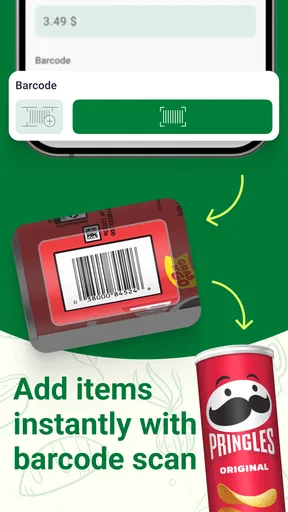
Barcode scanning can make initial entry quicker than typing every product name, and expiry tracking gives the inventory a useful time dimension. Still, a scan is not the same as a fully reliable record. Products without a recognized barcode, loose produce, leftovers, and food moved into unlabelled containers may need manual attention. Even a correctly identified product still needs a sensible expiry date attached or checked. I would treat scanning as a way to reduce repetitive typing, not as a reason to stop reviewing the details.
A practical approach is to enter groceries while unpacking them, when the packaging and dates are in front of you. For anything that gets divided into portions, note the amount or date in a way that will still make sense to you later, if the app’s available fields support it; otherwise, keep the record simple and prioritize the expiry reminder. The best inventory is not necessarily the most detailed one. It is the one you can understand quickly when you are standing in a shop or deciding what to cook.
Barcode coverage is a real limitation for shoppers who buy many local or small-brand products. When an item is not recognized, manual entry interrupts the quick-scan rhythm, and repeated gaps can make the setup feel less effortless than expected. That does not make the app unusable, but it changes who benefits most: people with a fairly predictable set of packaged groceries are likely to get more out of scanning than households whose purchases are mostly unpackaged or varied.
A realistic routine, not a perfect database
Picture coming home with groceries after work. You scan the packaged items that are easy to identify, enter a date for anything that needs attention soon, and put the rest away. A few days later, before heading out to shop again, you check the inventory and spot an ingredient you can use tonight. That small loop—record, check, use—is more valuable than building an exhaustive catalogue that nobody consults.
For a shared household, it helps to agree on a simple rule: whoever brings groceries in adds the important items, and whoever uses the last of a staple marks that change. Without a shared habit, the inventory can quietly drift away from reality. A record that says there is milk when the carton is empty is worse than no record at all because it encourages a wasted trip or a missing ingredient. I would keep the system forgiving: update the foods you rely on and accept that low-priority items may not always be perfectly accounted for.
Shopping lists are most useful when they reflect a quick check of the cupboards rather than a wish list made from memory. Before adding something, look for an open package or an alternate ingredient already on hand. That extra glance is a small but concrete way to avoid duplicate purchases. It also makes the app more useful as a planning aid than as a passive archive: the list should help answer what the household actually needs next.
How it compares with familiar alternatives
A paper list or a note on your phone is faster to start and needs almost no setup. For a short shopping list, that may be all you need. The advantage of a dedicated inventory app is the connection between stored items, dates, and planning; a plain note can record “tomatoes,” but it will not naturally serve as a running view of what is on hand and what should be used soon. The cost of that extra structure is the effort of entering and maintaining the records.
A spreadsheet offers more control for someone who enjoys designing their own system, but it can feel cumbersome on a phone during a grocery run. InvenDo is the more approachable direction if you want a purpose-built place for household food tracking rather than building columns and formulas yourself. On the other hand, anyone who needs extensive reporting, carefully measured stock levels, or a highly customized workflow should compare the app’s actual tools with those needs before moving an established system over. I would not assume a simple inventory app can replace a detailed household or business stock process.
There is also a useful distinction between tracking and automating. An expiry reminder can prompt you to check an item, but it cannot judge whether the food is still suitable or decide how your household should use it. Likewise, a recipe suggestion may spark an idea, but you still need to consider portions, preferences, and ingredients that are genuinely available. I see these features as prompts for better decisions, not substitutes for common sense.
Getting Started with InvenDo
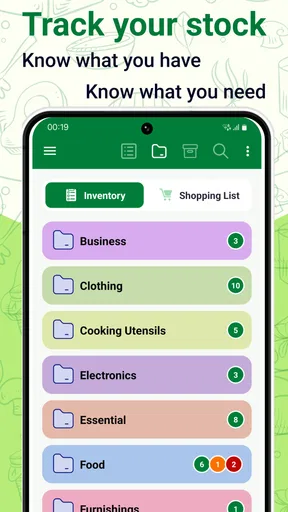
Diving into InvenDo was a breeze. The app's interface is intuitive, welcoming you with a clean dashboard that makes navigation a piece of cake. Setting it up was straightforward; after a quick sign-up, I was ready to start cataloging my kitchen treasures.
Main Features
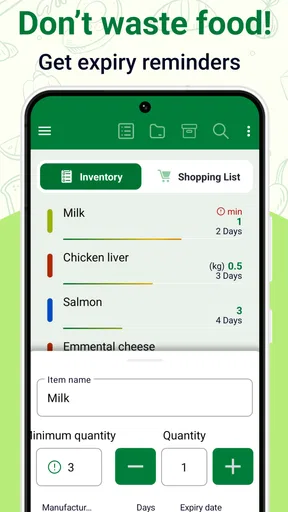
What really caught my eye was the app’s ability to scan barcodes. This feature is a game-changer for those of us who dread manual entry. Just a quick scan, and boom — the item is logged with all its glorious details. It even includes expiry dates, so you never have to worry about that mystery can of beans again.
Another standout feature is the recipe suggestion tool. Based on what you have in stock, InvenDo suggests recipes that can help you whip up a meal without a trip to the store. Perfect for those lazy evenings or when you're feeling a bit creative in the kitchen.
Seamless Sync and Notifications
Syncing across devices is as smooth as butter. Whether you’re on your phone or tablet, your inventory is always up-to-date. The app also sends handy notifications to remind you of items nearing their expiry date. It's like having a personal assistant who’s solely focused on your pantry!
User Experience
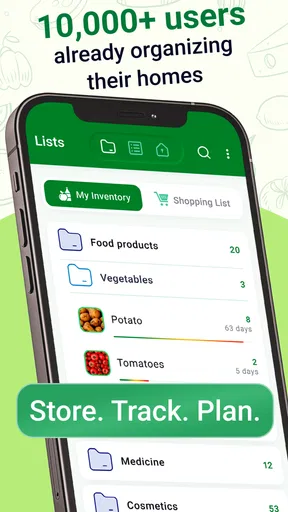
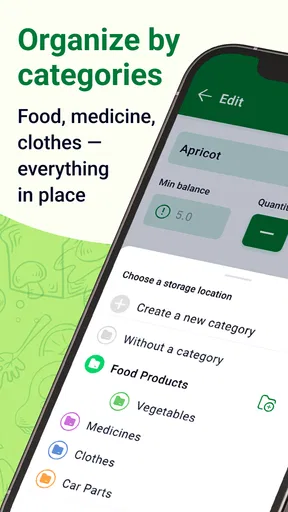
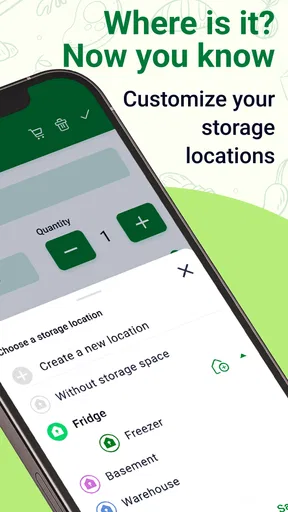
One thing I absolutely love is the customization options. You can categorize items any way you like, making it super easy to organize everything just the way you want it. The app is also quite responsive, with quick load times and no noticeable lag, even when my inventory list started to grow.
Room for Improvement?
While InvenDo does most things right, there’s always room for improvement. The barcode database, though extensive, had a few gaps. I found myself manually entering some items, especially those from smaller brands. A few tweaks and updates to the database could make this app even more unbeatable.
Moreover, while the app is generally user-friendly, a tutorial or help section could be beneficial for first-timers who might find themselves a bit lost navigating through all the features.
Choosing it for your household
I would recommend InvenDo to someone who regularly forgets what is tucked away in the pantry, buys repeat staples, or wants a nudge to use food before it is overlooked. It is especially suited to a household willing to share a simple routine for keeping the list accurate. A person living alone can benefit too, particularly if groceries often get pushed behind newer purchases, but the value depends on whether checking the inventory becomes part of shopping and meal planning.
I would skip it if you want a completely automatic record of everything you own, dislike entering details, or mostly shop for fresh loose ingredients that are difficult to scan. In those cases, a short handwritten list or a basic phone note may be less frustrating. Someone who already uses a well-maintained spreadsheet may also have little reason to move unless the dedicated reminders and food-focused workflow solve a specific problem for them.
The app is free to download, with in-app purchases ranging from $1.99 to $74.99 per item. I would begin with the free experience and only consider a purchase if you have identified a particular capability you need; there is no reason to spend simply because a pantry list feels promising. It is rated for Everyone, the current version is 1.0.4, and it runs on Android 6.0 or later. Those details make it easy to assess basic compatibility, while the actual fit still comes down to your household’s habits.
Final Thoughts
Overall, Home Inventory & Food: InvenDo is a fantastic tool for anyone aiming to organize their kitchen and reduce food waste. Its robust features, like barcode scanning and recipe suggestions, make it a must-have for busy households. Despite a few minor kinks, it’s a reliable companion for anyone looking to manage their pantry more effectively.
So, if you’re ready to take control of your kitchen chaos, why not give InvenDo a try? It might just become your new best friend in the culinary world!
My verdict after weighing the trade-offs
My overall view is positive, with one clear condition: use it as a lightweight routine rather than a one-time organizing project. Start small, keep dates and records focused on food you are likely to forget, and check the list at the moments when it can change a decision. That makes the app’s barcode entry, expiry reminders, and recipe ideas work together instead of becoming separate features you rarely open.
InvenDo is not a replacement for careful food handling, a detailed stock-control system, or a shopping habit that already works perfectly. But for a household that wants a better view of what is in the kitchen and is willing to keep that view reasonably current, it offers a useful middle ground between scattered notes and a custom spreadsheet. I would try it if pantry surprises and repeated purchases are familiar frustrations; if maintaining another list sounds worse than those problems, a simpler alternative is probably the better choice.
Verdict
Strengths of Home Inventory & Food: InvenDo
- User-friendly interface for quick navigation.
- Customizable categories for easy organization.
- Barcode scanner simplifies adding items.
- Cloud backup ensures data safety.
- Supports multiple languages for global use.
Limitations of Home Inventory & Food: InvenDo
- Limited free version features.
- No integration with smart home devices.
- Occasional sync issues with cloud.
- Requires manual updates for expiration dates.
- No offline mode available.
Similar Picks in This Category
View All
Universal TV Remote Control
CodeMatics Media Solutions3.9

AlfredCamera Home Security app
Alfred Systems Inc.4.7

Planner 5D: AI Home Design
Planner 5D4.5

Universal Tv Remote-Cast to TV
One Music Player4.1

Zillow: Homes for Sale & Rent
Zillow Group4.8

99acres Buy/Rent/Sell Property
infoedge.com4.3
Frequently Asked Questions
What is Home Inventory & Food: InvenDo used for?
Home Inventory & Food: InvenDo is designed to help users keep track of their household items and food inventory. It allows you to catalog all your possessions, manage expiration dates, and organize grocery lists. This app is particularly useful for minimizing waste and ensuring that you always know what items you have at home.
Is Home Inventory & Food: InvenDo available for both Android and iOS?
Yes, Home Inventory & Food: InvenDo is available for download on both Android and iOS platforms. You can find it on the Google Play Store and the Apple App Store, making it accessible for a wide range of smartphone and tablet users.
Does InvenDo offer any cloud backup for inventory data?
InvenDo provides cloud backup options to ensure your inventory data is safe and accessible across multiple devices. By syncing your data to the cloud, you can easily restore your information if you switch devices or experience data loss, offering peace of mind for all your home inventory needs.
How user-friendly is the interface of Home Inventory & Food: InvenDo?
The interface of Home Inventory & Food: InvenDo is designed to be intuitive and user-friendly, even for those who are not tech-savvy. With clear navigation and easy-to-use features, users can quickly learn how to input and manage their inventory without any hassle, making the app accessible to everyone.
Are there any in-app purchases or subscription fees in InvenDo?
InvenDo offers a free version with essential features to manage your inventory. However, there are in-app purchases available for users who wish to access premium features, such as advanced reporting and additional cloud storage. These purchases are optional and can enhance the overall functionality of the app.
